A thoughtful gift for a programmer can make focused work, collaboration, or downtime at the desk more comfortable. These ten ideas span useful workspace gear, audio tools, and gaming accessories.
Consider how the recipient works and what devices they use. A well-matched upgrade can be more useful than another generic desk accessory.
10 Gift Ideas for Programmers for Work, Play, and Creative Projects
FIFINE T669 USB Condenser Microphone Kit

- USB plug-and-play connection works with PC and laptop without additional hardware or drivers.
- The kit includes an adjustable boom arm and a double pop filter.
- A cardioid condenser capsule captures audio from the front.
Best Gift For: A programmer who records podcasts, voiceovers, or gaming audio at a desk.

HUANUO FlowLift Single Monitor Mount

- Fits monitors from 13 to 32 inches and holds 4.4 to 19.8 pounds.
- The arm offers tilt, swivel, and rotation adjustments.
- Choose between a C-clamp or grommet mount.
Best Gift For: A programmer whose monitor fits the mount and who wants to adjust its desk position.
SteelSeries Arctis Nova Pro Wireless Headset

- Connect two systems at once and switch between supported systems.
- Active noise cancellation helps reduce distracting sounds during gaming.
- Two hot-swappable batteries let one battery charge while the other is in use.
Best Gift For: A programmer who games across compatible PC, PlayStation, Switch, or Mac systems.
Nulaxy 18-Inch Rotating Aluminum Laptop Stand
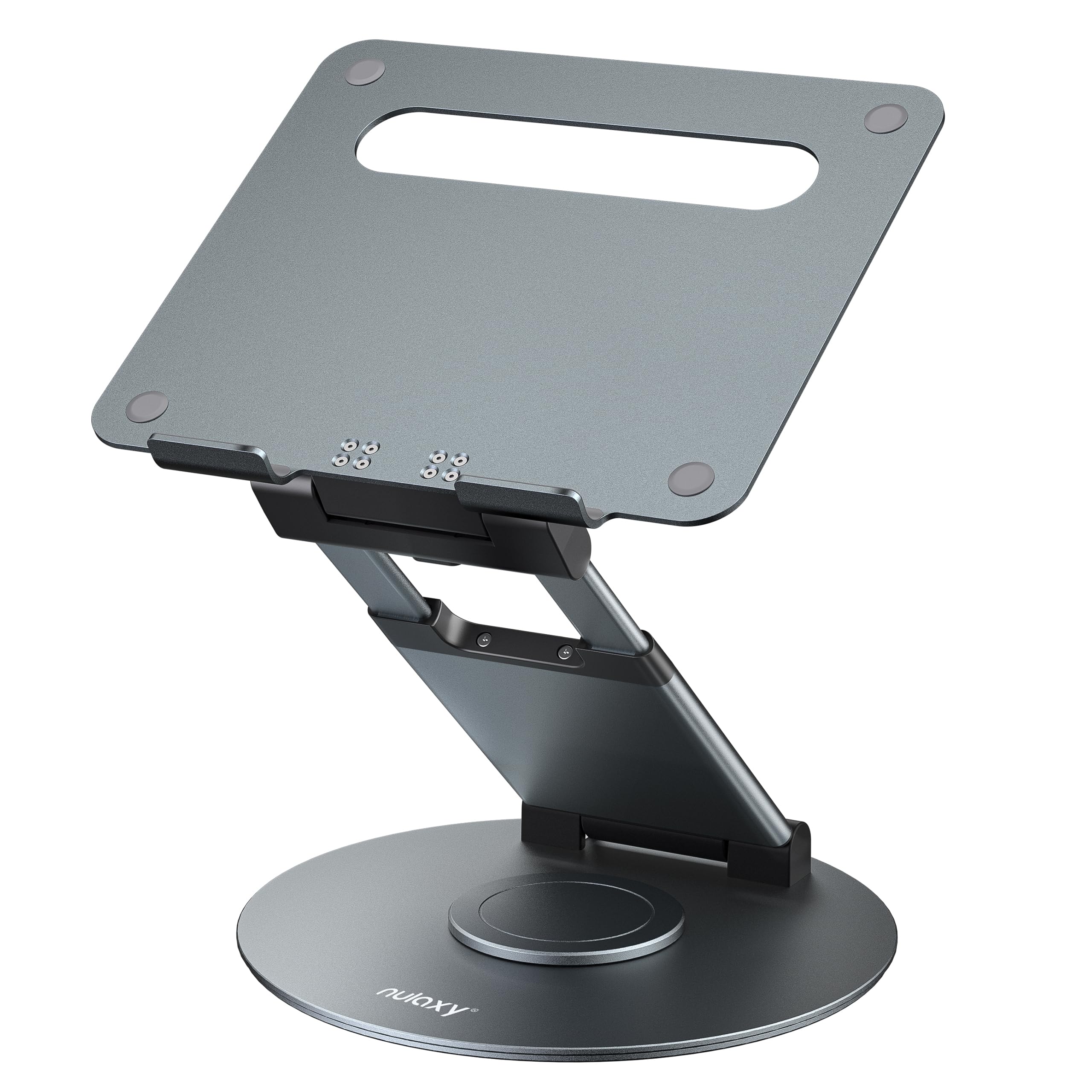
- The stand rotates to make screen sharing easier at a desk.
- Its height adjusts up to 18 inches for seated or standing work.
- It fits laptops and tablets up to 17 inches.
Best Gift For: A programmer who shares a laptop screen during desk meetings or works seated and standing.
SteelSeries Apex Pro HyperMagnetic Gaming Keyboard

- Adjustable switches offer per-key actuation settings.
- Program two actions to a single key using different press depths.
- The OLED display shows information from games and apps.
Best Gift For: A programmer who also games and wants to customize key actuation.
SteelSeries Rival 5 Gaming Mouse

- The mouse has nine programmable buttons, including five quick-action side buttons.
- Its optical sensor supports one-to-one tracking.
- The mouse weighs 85g.
Best Gift For: A programmer who plays fast-paced games and wants programmable side buttons.
Audioengine A2+ Wireless Computer Speakers

- Compact powered speakers are designed for nearfield desk listening.
- Bluetooth and wired connections support a range of devices.
- The cabinets are handcrafted from real wood.
Best Gift For: A programmer who listens to music, podcasts, or game audio at a desk.
TP-Link AXE5400 Tri-Band WiFi 6E Router

- The router has a 6 GHz band with more bandwidth and faster speeds.
- OneMesh support can connect with a TP-Link OneMesh extender.
- It supports VPN server and client functions.
Best Gift For: A programmer looking to upgrade a compatible home network for gaming, streaming, and video calls.
SABRENT USB-C 6-Port Hub and M.2 SSD Dock

- The hub connects through USB-C and includes USB ports and up to 90W bypass charging.
- Its HDMI port supports an external display at up to 4K@60Hz on a compatible device.
- The M.2 slot supports M.2 SATA or NVMe SSDs in 2242, 2260, or 2280 form factors.
Best Gift For: A programmer who wants to connect peripherals, an external display, or additional SSD storage to a compatible USB-C device.
MAONO Wave T5 Mini Wireless Lavalier Microphone

- The wireless microphone records at 48kHz/24-bit.
- Four voice presets offer different sound profiles for recording.
- The charging case provides 40 hours of total use.
Best Gift For: A programmer who makes video tutorials, voiceovers, or other recordings on the go.
1. Match gifts for programmers to how they work
Start with the recipient’s actual routine. Someone who spends the day switching between code, calls, and a second monitor may appreciate a more adjustable desk setup, while a person who records tutorials or podcasts may use audio gear more often.
For gifts for programmers, their current workflow is a better guide than assumptions about what every programmer likes.
Look for clues in their setup: do they mention an awkward screen angle, a crowded desk, unreliable connections, or wanting to make clearer recordings? A useful gift addresses one of those small, recurring frictions.
If you are unsure, ask a mutual friend what devices they use and whether they have mentioned a particular upgrade.
Compatibility deserves a little research before choosing a technical accessory. Check the computer or console model, connection type, monitor size and weight, and whether the recipient already owns an item that fills the same role.
For network gear, confirm it fits the home setup and internet service before treating it as a straightforward replacement.
2. Set a comfortable budget and compare usefulness
Think about how central the gift will be to the recipient’s routine. A modest accessory can be a welcome upgrade when it solves a daily annoyance, while a more involved purchase makes sense when you know the person wants that specific kind of equipment.
A higher price alone does not make a gift more thoughtful.
Consider the full setup cost as well as the main item. Some upgrades need compatible cables, a suitable desk, additional peripherals, or a device that supports the relevant connection.
Before deciding, check current prices and product details, then account for any extra item the recipient would need to use the gift as intended.
When two options address the same need, favor the one with a clear fit for the person’s habits and existing equipment. Someone who enjoys gaming may value controls and headset features; someone focused on video calls may care more about their recording or audio setup.
Keep the recipient’s priorities at the center of the budget decision.
3. Personalize gifts for programmers around their interests
A small personal touch can make gifts for programmers feel chosen for the person rather than their job title. Pair a desk upgrade with a note about a project they are excited to finish, or connect a recording accessory to their interest in teaching, streaming, or sharing a creative hobby.
Keep the message warm and specific without turning the gift into a joke about long hours.
Presentation can suit the recipient’s style. For a practical person, wrap the item simply and include a short note about why you thought it would help.
For someone who enjoys building out a setup, make the unboxing feel like an invitation to explore the new feature or arrange a corner of their desk.
If you are coordinating with others, agree on the recipient’s preferred devices and intended use before pooling money. That can prevent duplicate equipment and help everyone contribute toward a compatible gift.
A handwritten card or a small personal add-on can make a shared purchase feel more individual without adding clutter.
4. Choose for the desk, the game room, or the road
A home-office gift should fit the available space and the recipient’s habits. Some people prefer a clean desk and a compact setup; others enjoy a more adjustable workstation.
Think about where the gift will sit, how often it may be moved, and whether it fits the person’s existing furniture before choosing a larger desk accessory.
For gaming-focused recipients, think about what they play and which systems they use. A feature that helps with one style of play may matter less to someone with different tastes, so check their favorite games or ask someone who plays with them.
For audio gear, consider whether they mainly use headphones, speakers, or a microphone for calls and recordings.
A portable setup calls for different priorities from a permanent workstation. If the recipient works in multiple places, consider whether a gift would be convenient to carry and compatible with the devices they take along.
Check dimensions, connectors, and supported systems before buying, especially when the accessory needs to connect directly to a laptop or phone.
5. Make a last-minute choice with time to check
When time is short, choose a gift whose purpose and compatibility you can verify quickly. A familiar accessory for a device the recipient already owns is often easier to assess than a complex replacement for their whole setup.
Look for the exact model of their computer, monitor, or game system if the product depends on it.
Before placing an order, review the current product details, dimensions, compatibility, and delivery estimate. Delivery timing can change, so use the estimate shown for your location rather than assuming a particular arrival date.
If the timing is uncertain, a card explaining the planned gift can still make the occasion feel considered.
For a final check, ask whether the gift fills a real gap, suits the recipient’s interests, and fits the space or devices they have. A thoughtful pick can be practical, playful, or creative; the important part is that it reflects the person.
Give yourself a moment to compare the details, then choose with confidence.