The best audio mixers for content creation depend on what you need to connect, from an XLR microphone and guitar to game audio or a second PC. These picks span simple recording interfaces and feature-rich gaming mixers, so match the inputs and controls to your setup before choosing.
Quick Top Products
FIFINE Ampli 1
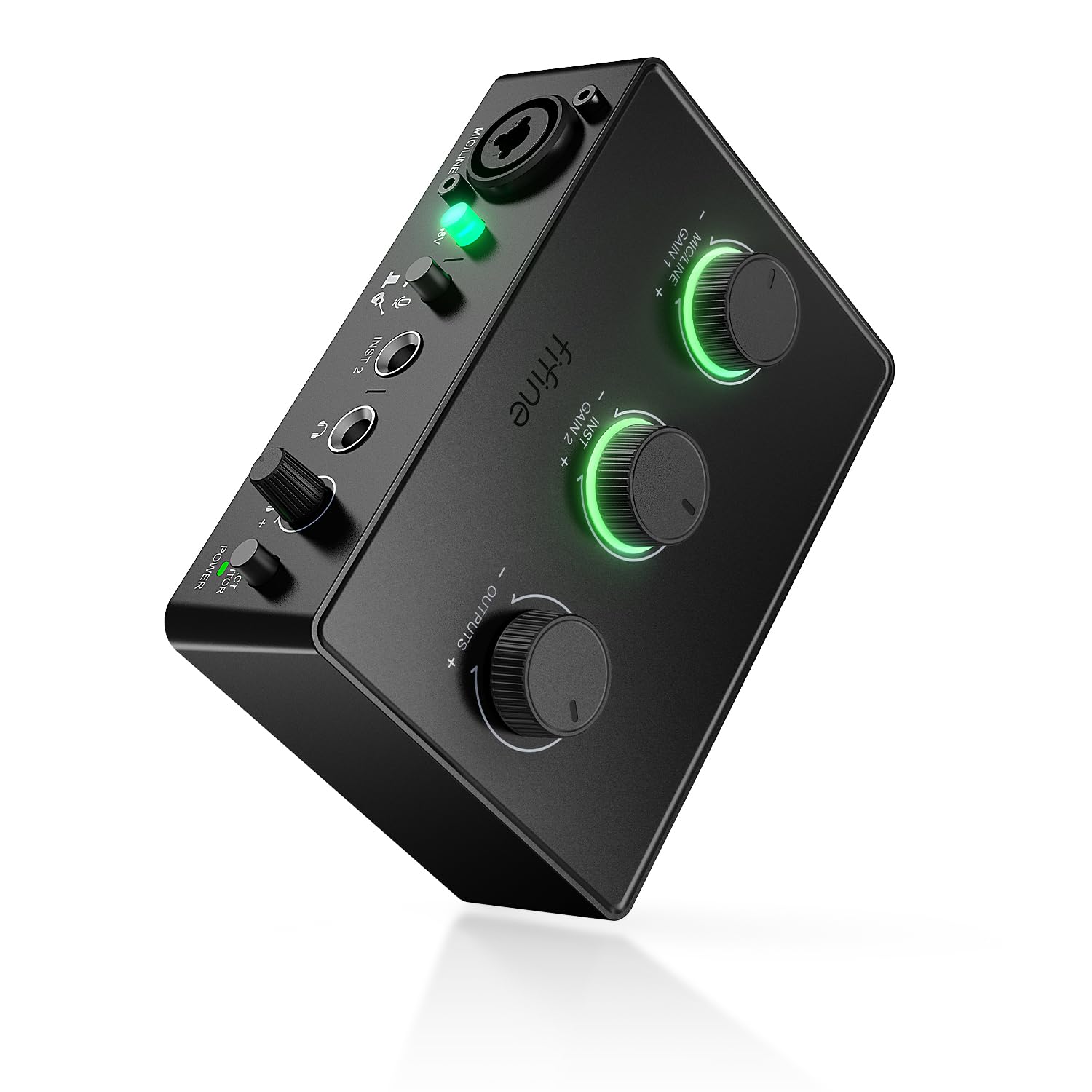
- Connect an XLR microphone and an instrument such as guitar or bass.
- 48V phantom power and a dedicated mic gain knob support input adjustment.
- Direct monitoring has a dedicated volume control.
Best For: Home creators who want to record an XLR microphone and guitar or bass through one compact interface.

FIFINE AmpliGame SC3
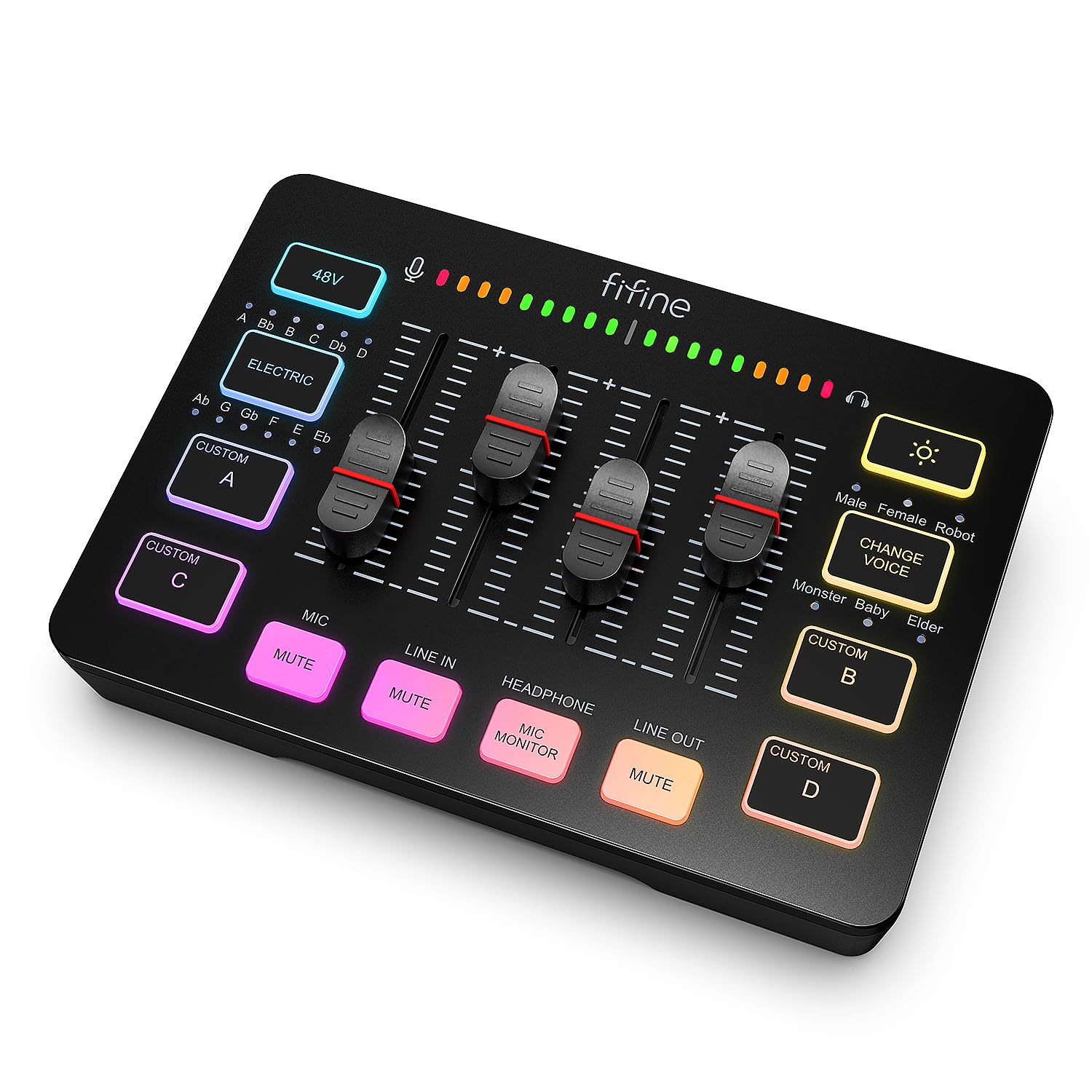
- Four independent controls cover microphone, line in, headphones, and line out.
- Front-panel mute and monitor buttons provide quick access during a stream.
- Includes four customizable sound buttons and six voice-changing modes.
Best For: Streamers who want separate physical level controls and quick access to mute and monitoring.
FIFINE AmpliGame SC3W
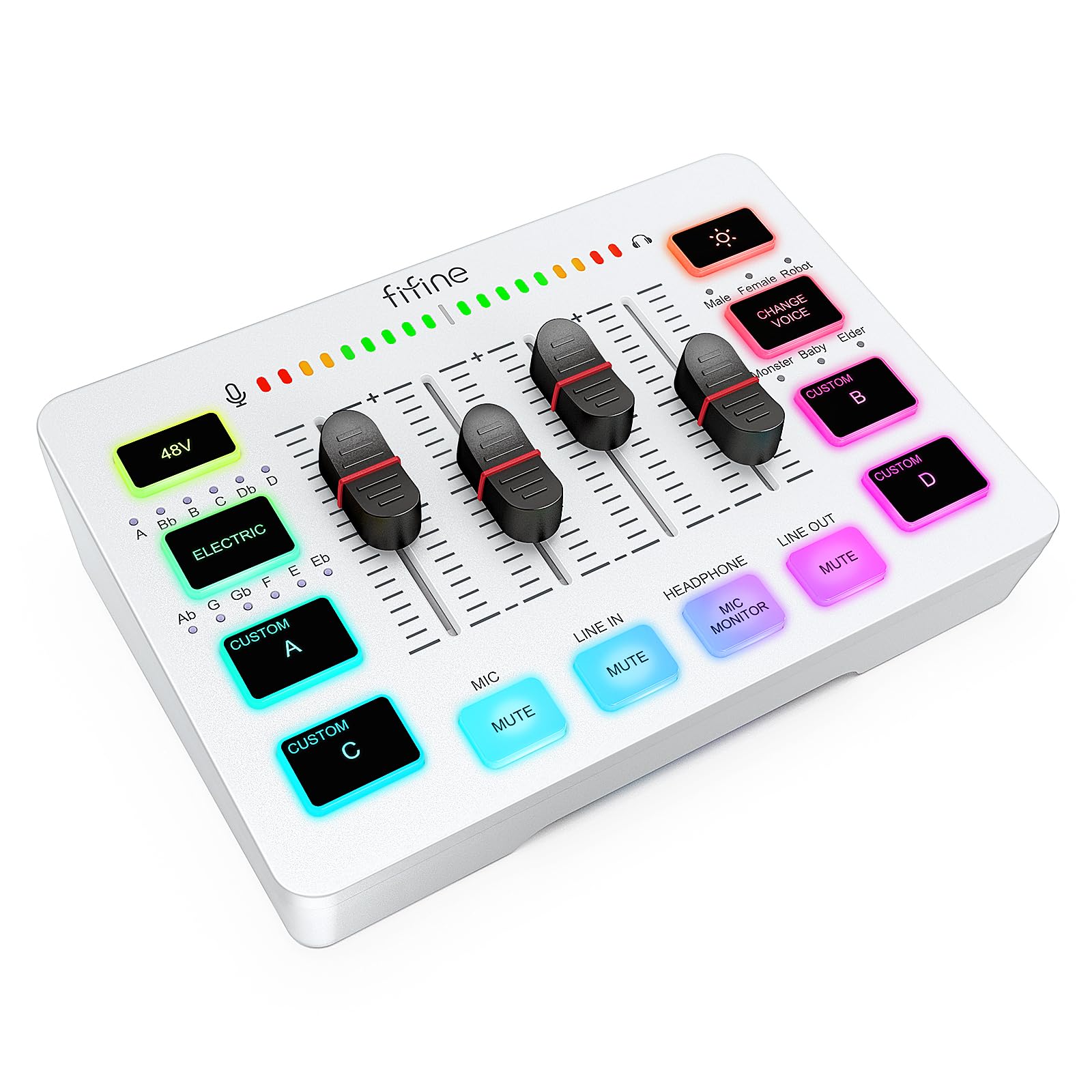
- Four individual channels have separate adjustments and a push fader.
- XLR microphone input includes built-in 48V phantom power.
- Multiple ports support dual-PC streaming or other audio devices.
Best For: Gaming streamers who want individual volume controls and ports for connecting a dual-PC setup.
MAONO MaonoCaster G1 NEO
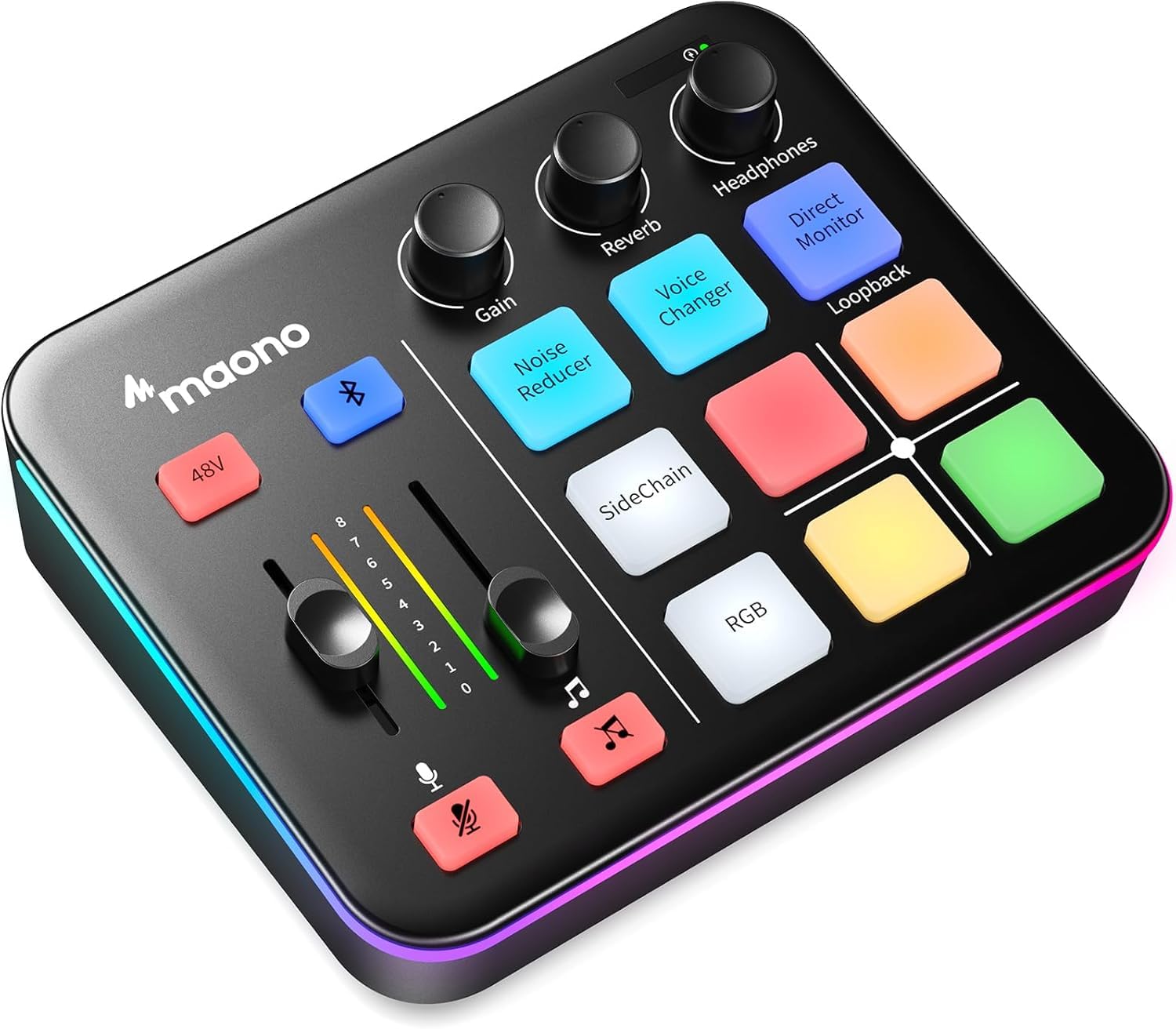
- Bluetooth accompaniment input can add audio to a stream.
- XLR input includes a preamp and 48V phantom power.
- Supports loopback, one-click mute, and direct monitoring.
Best For: Streamers who want Bluetooth accompaniment, voice effects, and RGB controls in a compact mixer.
FIFINE AmpliGame SC8P
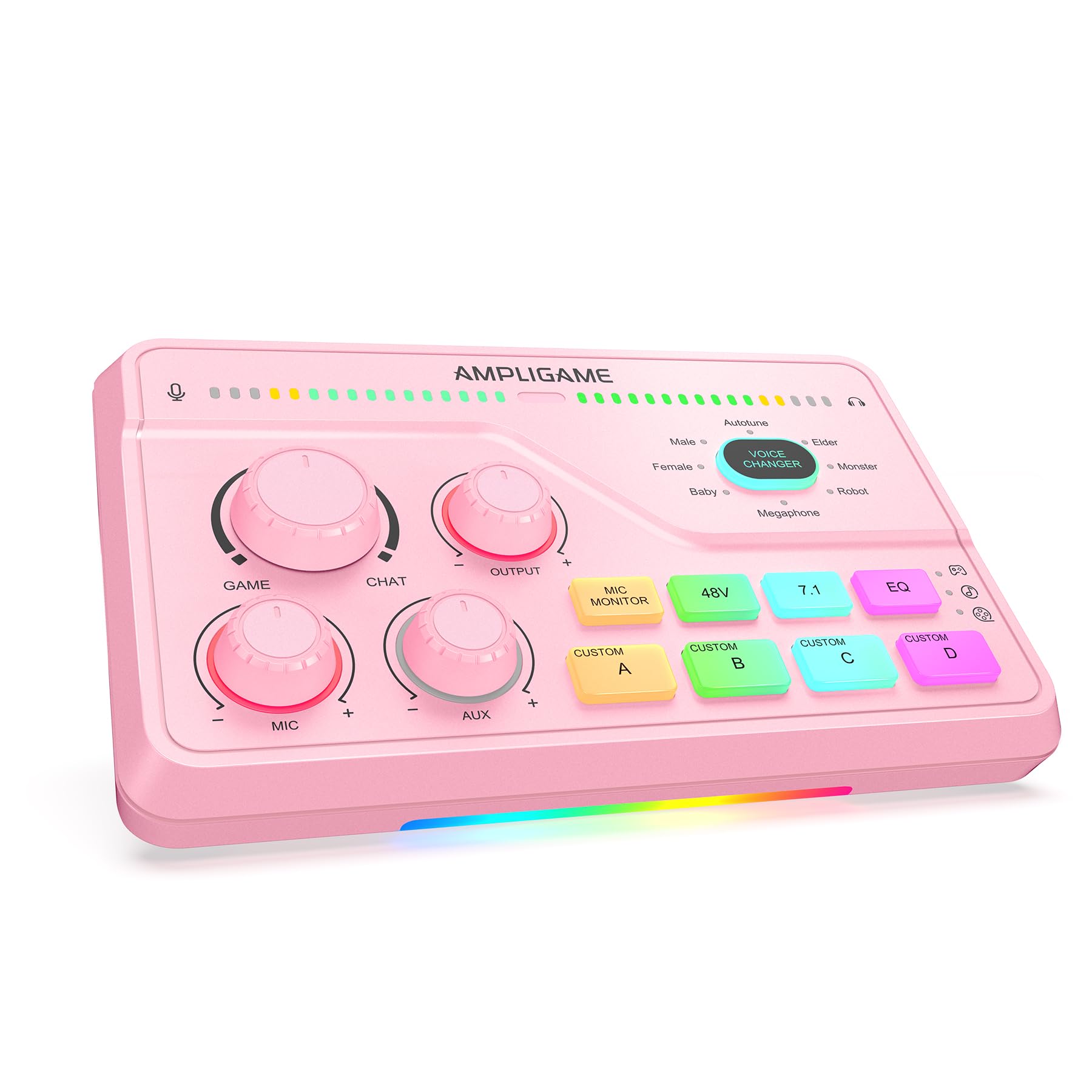
- Three knobs control mic, game audio, and background music separately.
- XLR input includes phantom power and a dynamic/condenser switch.
- Offers virtual 7.1 surround and three EQ modes.
Best For: Gamers and streamers who want separate volume controls, virtual surround modes, and XLR microphone support.
FIFINE AmpliGame SC8W
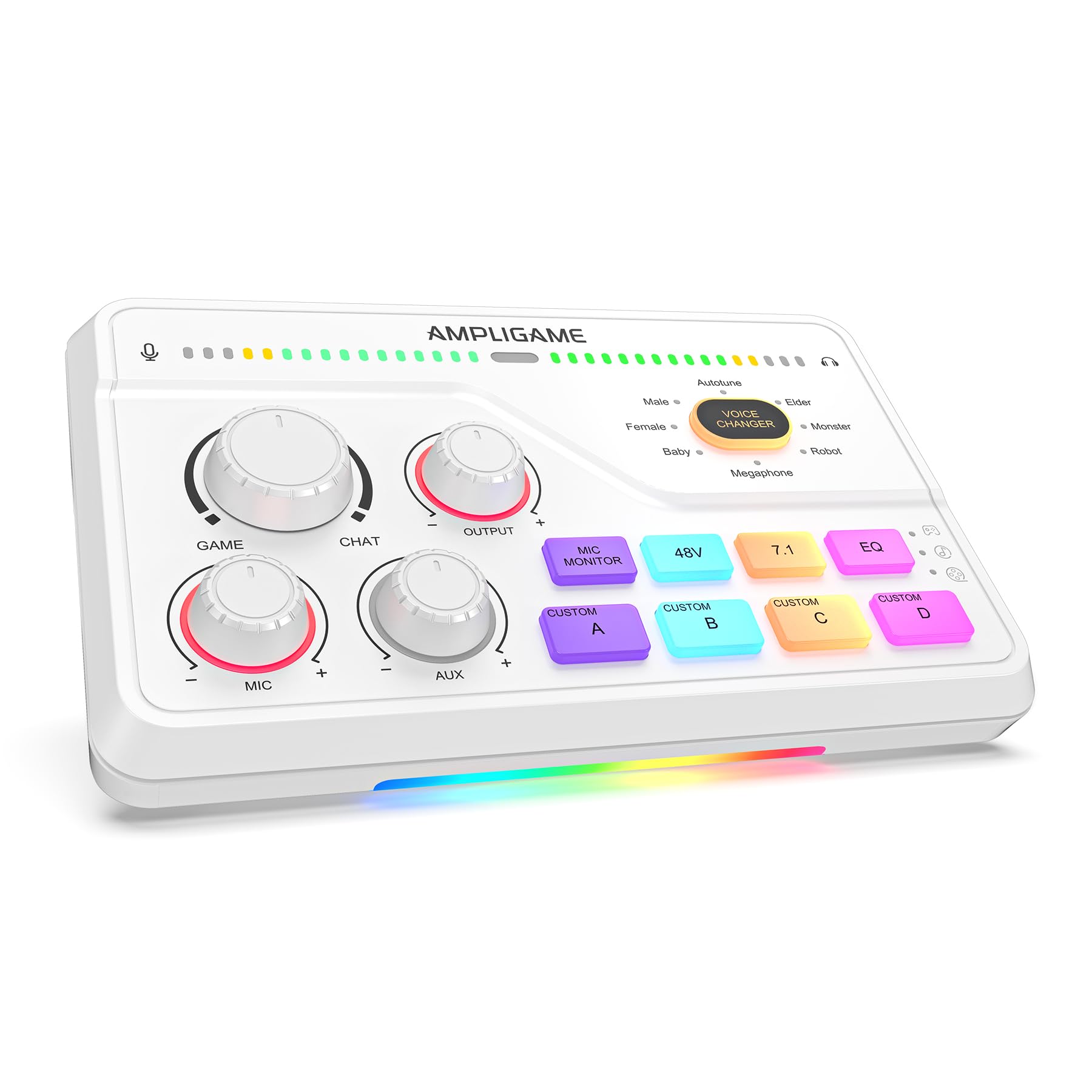
- A tactile Game/Chat dial balances game audio and team communications.
- Includes virtual 7.1 surround and specialized acoustic presets.
- Offers eight voice effects and four custom sound keys.
Best For: Console and PC gamers who want a physical Game/Chat balance dial and customizable sound keys.
FIFINE AmpliGame SC8
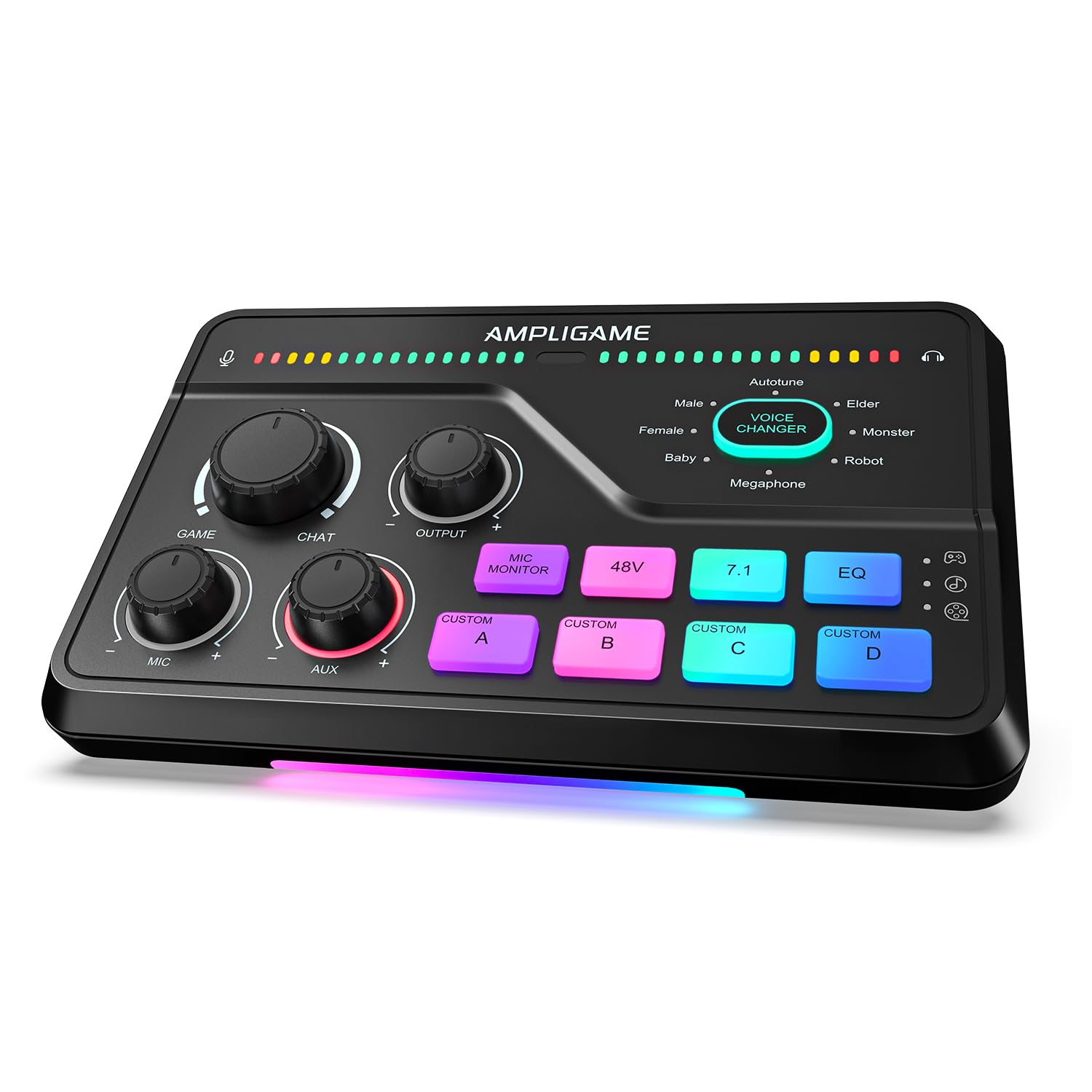
- Includes a Game/Chat dial and virtual 7.1 surround.
- Three knobs with push-mute controls adjust mic, game, and background audio.
- Eight voice effects and four customizable buttons support stream cues.
Best For: Streamers who want a Game/Chat dial, customizable effects, and virtual surround for gaming audio.
Instrument-Friendly Recording
FIFINE PC Audio Mixer for Recording Music, USB Interface for Streaming and Podcasting with XLR, Monitor, 48V Phantom Power, Gain Knob, for Instrument Guitar/Video Content Creation/Vocal-Ampli 1
The FIFINE Ampli 1 pairs an XLR microphone input with a dedicated instrument input, making it a practical fit for creators who record vocals and guitar or bass. Its 48V phantom power supports condenser microphones, while a gain knob gives direct control over mic input levels.
A separate output knob and direct monitoring control help manage playback and hear recordings in real time. It is a focused recording interface for Mac or PC, rather than a gaming mixer with voice effects or multiple channel faders.
Check that its two inputs and straightforward monitoring setup cover your intended recording workflow.
Best For: Home creators who want to record an XLR microphone and guitar or bass through one compact interface.
| Pros | Cons |
|---|---|
|
|
Choose this model if instrument recording matters as much as voice capture. Its separate instrument input is a meaningful distinction among these options, while direct monitoring and a dedicated output knob keep basic recording controls close at hand.
It offers fewer gaming-specific controls than the streaming mixers here, so check whether you need sound pads, RGB, or multi-device routing before buying. Also confirm that the two input types match the microphones and instruments in your setup.
Streaming Channel Fader
FIFINE Gaming Audio Mixer, Streaming RGB PC Mixer with XLR Microphone Interface, Individual Control, Volume Fader, Mute Button, 48V Phantom Power, for Podcast/Recording/Vocal/Game Voice-AmpliGame SC3
The FIFINE AmpliGame SC3 gives a solo streamer direct control over four audio channels: microphone, line in, headphones, and line out. Its smooth volume fader, front mute and monitor buttons, and built-in 48V phantom power suit a desk setup built around an XLR microphone.
Four customizable sound buttons and six voice-changing modes add quick effects for live chat or video creation. It supports Mac and Windows and can accommodate a two-PC setup or audio mixing.
The XLR cable is not included, and USB microphones are not supported, so check your mic connection and cable needs before buying.
Best For: Streamers who want separate physical level controls and quick access to mute and monitoring.
| Pros | Cons |
|---|---|
|
|
Pick the SC3 if you want a fader and distinct physical level controls for a single-mic streaming setup. Its channel layout gives hands-on control, and the customizable sound buttons suit creators who use short cues or voice effects.
Before buying, verify that your microphone is XLR and plan for a separate XLR cable. Its core strengths are streaming controls and routing flexibility, rather than a dedicated instrument input for recording guitar or bass.
Two-PC Streaming Setup
FIFINE Audio Mixer, Gaming Streaming PC Mixer with Slider Fader, XLR Microphone Interface, Monitoring, for Video/Game Voice/Podcast Recording-AmpliGame SC3W
The FIFINE AmpliGame SC3W is a gaming and streaming mixer with four individual control channels and a slider fader. It accepts an XLR microphone and provides built-in 48V phantom power for compatible condenser mics.
Mute, volume adjustment, and real-time monitoring cover everyday stream control, while its multiple audio ports support a dual-PC setup or connections to other audio devices. Voice changing, customizable sound buttons, and RGB lighting add entertainment-focused touches.
This option fits streamers building a gaming desk setup; check the exact connections against your computers and other devices, since the notes do not detail each port's format.
Best For: Gaming streamers who want individual volume controls and ports for connecting a dual-PC setup.
| Pros | Cons |
|---|---|
|
|
Consider the SC3W if your setup calls for multiple connected devices or two PCs and you want individual channel adjustments at the mixer. Its XLR input, monitoring, and mute controls cover common streaming tasks, while voice effects and RGB cater to gaming broadcasts.
The record does not clarify the connector formats for its ports, so check that they match your intended computer and audio connections. For instrument recording or more explicit channel descriptions, compare the recording interface and other mixers here.
Bluetooth and Sound-Effect Control
MAONO Gaming Audio Mixer, Audio Interface with Pro-preamp, RGB, Bluetooth, 48V Phantom Power for Live Streaming, Podcasting, Content Create, Gaming MaonoCaster G1 NEO (Not for USB Mic)
The MAONO MaonoCaster G1 NEO combines an XLR input and 48V phantom power with Bluetooth accompaniment, loopback, direct monitoring, and one-click mute. Its sound pads and voice-changing effects offer quick ways to add personality to streams, while reverb and sidechain functions support more involved audio interactions.
The mixer works with phones, computers, tablets, PS4, and PS5, and its RGB controls offer multiple color variations. It is explicitly not for USB microphones or Xbox.
Confirm your microphone type and intended device compatibility, and use the included USB A-C and 3.5 mm TRRS cables when they suit your setup.
Best For: Streamers who want Bluetooth accompaniment, voice effects, and RGB controls in a compact mixer.
| Pros | Cons |
|---|---|
|
|
Choose the G1 NEO if Bluetooth accompaniment and built-in stream effects are priorities. It combines those features with loopback, monitoring, and compatibility across several phone, computer, and console platforms.
Its stated exclusions matter: it does not support USB microphones or Xbox, so verify those before purchase. Compared with the FIFINE recording interface, it is oriented toward streaming interaction rather than a dedicated guitar or bass input.
Check the included cable types against your planned connections.
Separate Game, Voice, and Music Levels
FIFINE Streaming Audio Mixer with XLR Mic Interface & 7.1 Surround Sound, Gaming RGB Mixer for PC/PS4 with Individual Volume Knob, 3 EQ Mode, 48V Phantom Power,Voice Changer-AmpliGame SC8P
The FIFINE AmpliGame SC8P centers on gaming audio control, with three volume knobs for microphone, game audio, and background music. Its XLR input has 48V phantom power and a dynamic/condenser switch, while mic monitoring helps you hear your own level as you adjust.
Virtual 7.1 surround and Game, Music, and Movie EQ modes are designed for different listening scenarios. The mixer can connect to PS4 or a TV through optical AUX, and it also supports PC, PS5, Switch, and mobile devices through USB-C.
Check which connection path suits your devices and whether gaming-focused processing matches your recording needs.
Best For: Gamers and streamers who want separate volume controls, virtual surround modes, and XLR microphone support.
| Pros | Cons |
|---|---|
|
|
The SC8P is a strong fit when your mixer needs to balance gameplay, voice chat, and background music during use. Its separate knobs and Game/Chat-oriented processing serve gaming setups, while the XLR input supports a compatible microphone.
The optical AUX path can suit a PS4 or TV connection; USB-C covers other device types. It is less directly suited to a recording workflow centered on a guitar input, which the Ampli provides.
Check connection requirements and the included accessories before purchase.
Gaming Mix with Game/Chat Dial
FIFINE Audio Mixer for Gaming with 7.1ch Surround Sound-Volume Knob-Mute-Voice Chat, RGB Computer Mixer with XLR Mic Interface Compatible wtih TV for Live Streaming-AmpliGame SC8W
The FIFINE AmpliGame SC8W combines gaming audio routing with a dedicated Game/Chat dial for balancing environmental sounds and team communications. It supports virtual 7.1 surround and acoustic presets, plus eight voice effects and four programmable sound keys for stream or chat cues.
An XLR input with 48V phantom power and a dynamic/condenser switch supports different microphone types. Optical AUX connects to a PS4 or TV, while USB-C supports PC, PS5, Switch, or mobile devices.
This feature set is aimed at gaming and streaming rather than straightforward instrument recording. Check that your device can use the required connection and that your microphone is compatible.
Best For: Console and PC gamers who want a physical Game/Chat balance dial and customizable sound keys.
| Pros | Cons |
|---|---|
|
|
Choose the SC8W if direct control over the game-to-chat balance is central to your gaming setup. Its dial, surround processing, and sound keys offer a different emphasis from mixers with four channel sliders or a dedicated instrument input.
The XLR microphone connection and multiple device paths add flexibility, but confirm the connection type your system requires and whether its voice and surround features serve your intended content. The product notes do not clarify how saved sound key assignments behave after power is removed.
Voice Effects and 7.1 for Chat
Fifine Gaming Mixer for Voice Chat and Streaming- 7.1ch Surround Sound Headphone Amp-XLR Preamp-USB Plug & Play-Voice Changer-RGB-Volume Control-3 EQ Modes Ampligame SC8
The FIFINE AmpliGame SC8 pairs a dedicated Game/Chat balance dial with virtual 7.1 surround and three EQ presets for gaming audio. Three knobs with push-mute controls adjust microphone, game, and background audio, while eight voice effects and four customizable buttons add options for chat or streaming cues.
Its XLR input includes 48V phantom power and a dynamic/condenser toggle. USB-C supports PC, PS5, Switch, and mobile devices, and optical AUX connects to PS4 or TV.
It does not support USB microphones, and the XLR cable is not included. Check your mic and cable needs before choosing it.
Best For: Streamers who want a Game/Chat dial, customizable effects, and virtual surround for gaming audio.
| Pros | Cons |
|---|---|
|
|
This SC8 suits gaming streamers who want a Game/Chat dial, multiple EQ modes, and quick voice or sound effects. Its push-mute knobs give hands-on access to mic, game, and background levels, while the headphone amp supports a compatible headphone load.
It shares a feature-rich gaming focus with the SC8P and SC8W, so compare their documented control layouts and connection needs. Confirm that you use an XLR or 6.35 mm microphone and budget for the separate XLR cable if needed.
How to Choose Audio Mixers
How We Picked Best Audio Mixers
This roundup focuses on mixers and interfaces that serve content creation, including streaming, gaming chat, podcasting, and instrument recording. The selected products offer a clear role: the Ampli adds a dedicated instrument input, while the SC3 and SC3W emphasize hands-on channel control and streaming connections.
The G1 NEO adds Bluetooth accompaniment and sound effects. The SC8 family centers on gaming audio balance, surround processing, and quick controls.
Inputs, monitoring, routing, and stated device compatibility shaped the selection. We also considered practical limits that affect setup, such as USB microphone support and whether an XLR cable is included.
Match these details to the microphone, computer, console, and other audio sources you actually plan to connect.
Comparing Audio Mixers for Streaming and Recording
The main choice is between a recording interface and a gaming mixer. The Ampli 1 has both XLR and instrument inputs with direct monitoring, making it the clearest match for recording voice alongside guitar or bass.
The SC3 offers four separately controlled paths and a fader; the SC3W provides four individual channels and ports for a possible dual-PC setup, though its port formats are not detailed.
The G1 NEO adds Bluetooth accompaniment, loopback, reverb, sidechain, and sound pads, but it excludes USB microphones and Xbox. SC8P, SC8W, and SC8 share a gaming-oriented feature set with 7.1 surround and quick audio adjustments.
The SC8P lists separate mic, game, and music knobs. The SC8W and SC8 include a Game/Chat dial, and the SC8 also specifies three EQ presets.
Check the particular model's connections rather than assuming that similarly named devices share every feature.
| Product | Standout features | Best for |
|---|---|---|
| FIFINE Ampli 1Check Price |
| Home creators who want to record an XLR microphone and guitar or bass through one compact interface. |
| FIFINE AmpliGame SC3Check Price |
| Streamers who want separate physical level controls and quick access to mute and monitoring. |
| FIFINE AmpliGame SC3WCheck Price |
| Gaming streamers who want individual volume controls and ports for connecting a dual-PC setup. |
| MAONO MaonoCaster G1 NEOCheck Price |
| Streamers who want Bluetooth accompaniment, voice effects, and RGB controls in a compact mixer. |
| FIFINE AmpliGame SC8PCheck Price |
| Gamers and streamers who want separate volume controls, virtual surround modes, and XLR microphone support. |
| FIFINE AmpliGame SC8WCheck Price |
| Console and PC gamers who want a physical Game/Chat balance dial and customizable sound keys. |
| FIFINE AmpliGame SC8Check Price |
| Streamers who want a Game/Chat dial, customizable effects, and virtual surround for gaming audio. |
Choosing a Mixer for Podcasting or Instrument Recording
For a spoken-word recording setup, prioritize the microphone input, gain adjustment, and monitoring controls you will use. The Ampli 1 has an XLR input, mic gain knob, and direct monitor control, plus an instrument input if your recordings include guitar or bass.
The gaming models can still suit voice capture, but their features are aimed more at live chat, sound effects, and managing game audio.
Check the microphone connection before buying. The SC3, G1 NEO, and SC8 explicitly rule out USB microphones; the SC8 also accepts a 6.35 mm mic according to its notes.
The Ampli 1 and SC3W describe XLR microphone inputs. For a condenser XLR microphone, several models provide 48V phantom power.
Make sure the required cable is part of your setup: the SC3 and SC8 say their XLR cable is not included.
Audio Mixer Connections for PC, Console, and Dual-PC Streaming
Device fit depends on the ports, not just the mixer category. The SC3 supports Mac and Windows and describes a two-PC setup.
The SC3W also notes dual-PC streaming, but does not specify each port format, so verify those connections. The G1 NEO names phones, computers, tablets, PS4, and PS5 as compatible, while excluding Xbox.
The SC8P, SC8W, and SC8 use USB-C for PC, PS5, Switch, and mobile devices, with optical AUX connections described for PS4 or TV. The SC8W and SC8 also include 3.5 mm AUX input for additional audio.
Before selecting a streaming mixer, map each source and output—microphone, game device, headphones, and stream computer—to the connections the exact model supports.
Who Should Buy Which Audio Mixer?
Choose the FIFINE Ampli 1 for a simple recording setup that needs both an XLR microphone and instrument input. Choose the AmpliGame SC3 for a fader, four independently controlled paths, and front-panel mute and monitoring.
The SC3W is worth considering when multiple devices or a dual-PC arrangement are the priority, after checking its port formats.
Pick the MAONO G1 NEO if Bluetooth accompaniment and effects matter and your microphone and device are supported. For game and chat control, compare the SC8P's separate mic, game, and music knobs with the SC8W's Game/Chat dial and the SC8's dial, EQ presets, and push-mute controls.
The best fit is the one whose inputs and control layout match your actual recording or streaming workflow.